Script Planning & Design
Before you write a single line of code, you need a plan. A well-designed script is easier to build, debug, and maintain.
Why Plan Your Script?
Section titled “Why Plan Your Script?”A plan helps you:
- Understand what the script needs to do before coding
- Identify all the steps in the right order
- Know what input and output you need
- Catch problems early (much easier than debugging later)
- Create a flowchart that guides development
The Design Process
Section titled “The Design Process”1. Define the Goal
Section titled “1. Define the Goal”Write a clear, single sentence describing what your script does.
Example: “Monitor free memory every 60 seconds and log results to a SQL file”
2. List Input Data
Section titled “2. List Input Data”What information does the script need from the user or system?
- User arguments (command-line parameters)
- File paths or configuration
- System information
- User choices (menu options)
Example inputs:
- Duration in seconds (from user argument)
- Output filename (from user argument)
- Machine hostname (from system)
3. List Output Data
Section titled “3. List Output Data”What does the script produce or display?
- Files created or modified
- Console messages
- Choices presented to the user
Example outputs:
- Warning message if file exists
- Menu options (1/2/9)
- Results file location
- Progress display (free memory readings)
4. Break Down the Steps
Section titled “4. Break Down the Steps”List every step your script performs, in order. Be specific.
Example steps:
- Set default values for variables
- Check if user provided different values
- Check if output file already exists
- If exists, ask user what to do (add/delete/quit)
- Calculate stop time
- Loop: check memory, write to file, show progress
- Display results location
- Ask user if they want to open the file
5. Create a Flowchart
Section titled “5. Create a Flowchart”A flowchart shows the flow of your script visually:
- Ovals (Pills) = Start/End
- Rectangles = Actions or processes
- Diamonds = Decisions (if/else)
- Arrows = Flow direction
Use your steps above to draw the flowchart. Include every decision point (diamonds) where your script asks a question or makes a choice.
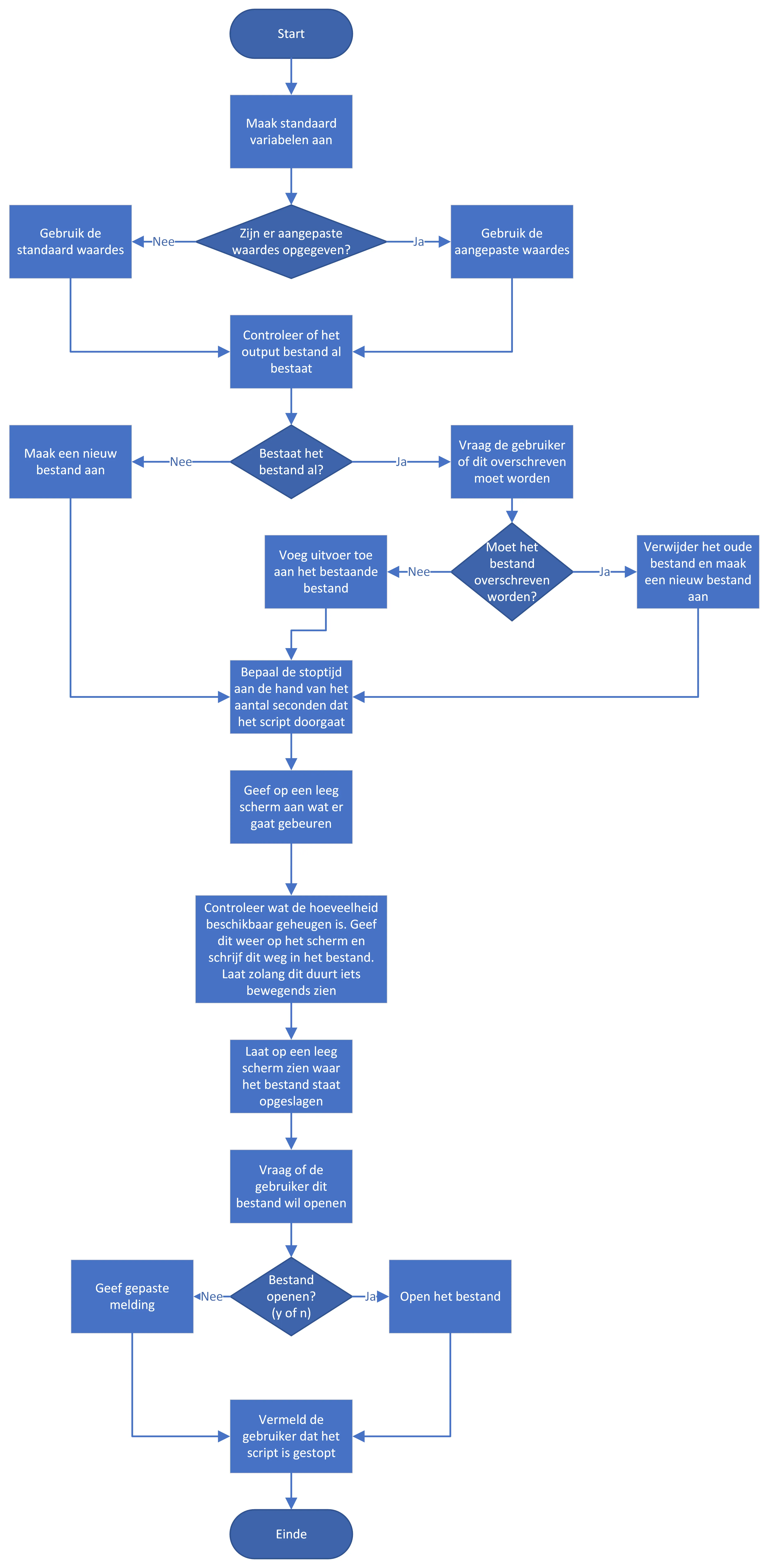
Rules of Thumb:
- Start at the top
- End at the bottom
- Every diamond (decision) has two paths: Yes and No
- Every action leads to the next step
- Loops circle back to earlier steps
6. Validate Your Plan
Section titled “6. Validate Your Plan”Before coding, ask:
- Does every input have a purpose?
- Does every step have a clear outcome?
- Are all decisions handled (Yes/No paths)?
- Is the order logical?
- Have I covered edge cases (file exists, invalid input, etc.)?
Example: Memory Monitor Script
Section titled “Example: Memory Monitor Script”Goal: Monitor free memory for a specified duration and save results to a SQL file.
Input data:
- Duration in seconds (default: 60, user can override)
- Output filename (default: MemoryResults.sql, user can override)
- Machine hostname (automatic from system)
- User choice if file exists (menu: add/delete/quit)
Output data:
- Warning message if output file already exists
- Menu options: [1] Add results, [2] Delete and start fresh, [9] Quit
- Console display of current free memory
- Results file location
- Offer to open the file when done
Steps:
- Set default variable values (60 seconds, MemoryResults.sql, hostname)
- Check if user provided arguments; override defaults if valid
- Check if output file exists
- If yes: ask user (add/delete/quit)
- If no: create file
- Calculate when to stop (current time + duration)
- Display what will happen (clear screen, show parameters)
- Loop until stop time reached:
- Get current free memory
- Write to file with timestamp
- Show progress indicator
- Clear screen and show file location
- Ask if user wants to open file
- Display completion message
This plan becomes your flowchart and guides every line of code you write.